Envato Elements and Adobe Stock are two popular stock photo and stock video sites. Although they offer similar types of assets, they differ in terms of quantity, quality, and cost.
- Adobe Stock 10-Assets: $29.99 per month + 30-day free trial
- Envato Elements: $16.50/mo (was $39.00/mo)
Adobe Stock vs. Envato Elements at a glance
Whether Envato Elements is better than Adobe Stock depends on your needs. Envato Elements is more affordable and comes with unlimited downloads, but Adobe Stock has a larger and higher-quality royalty-free library. Both offer the same breadth of content, from stock images and video to templates, fonts, and 3D.
| Service | Adobe Stock | Envato Elements |
|---|---|---|
| Cost | $29.99 per month for 10 downloads | $16.50 per month for unlimited downloads |
| Content | 366 million images, 37 million videos, 156,000 templates, 17,000 3D, 20,000 (Adobe Fonts) fonts | Agency review post not found images, Agency review post not found videos, Agency review post not found music, Agency review post not found SFX, Agency review post not found templates, 3D, Agency review post not found add-ons, Agency review post not found fonts, 5,400 themes and plugins |
| License | Royalty-free | Royalty-free |
| Best deal | 30-day free trial | 10% off your next purchase |
| Indemnity | $10,000 | $234 |
Envato Elements is cheaper, but Adobe Stock has on-demand plans
Envato Elements is cheaper than Adobe Stock, with a yearly plan priced at $16.50/month for unlimited downloads compared to Adobe Stock’s $29.99/month for 10 image and audio downloads or 1 video. Adobe Stock also has higher-tier plans for up to 750 monthly images or 25 videos for up to $199/month.
This makes Envato Elements better for freelancers and creatives on a budget, while Adobe Stock is best for professionals, teams, or freelancers working for clients with larger budgets.
| Service | Adobe Stock | Envato Elements |
|---|---|---|
| 1-month plan | $49.99/month | $39/month |
| 1-year plan | $29.99/month | $16.50/month |
| Current deal | $29.99/month + 30-day free trial | $14.85/mo with 10% discount |
With Envato’s subscription, you get unlimited downloads from the entire library. On a monthly basis, it costs $39 per month or $16.50 per month on a yearly basis. Students get a 30% discount on both options, while our partnership with Envato Elements can give you 10% off your next purchase.

Adobe Stock, on the other hand, has more elaborate plans. First, there are subscriptions ranging from 10 to 750 monthly downloads of images, audio, and templates or 1 to 25 videos or any mix of those. These plans cost between $29.99 and $249.99 per month, depending on the size and the duration.
If subscriptions are not for you, you can also buy assets on-demand, but doing so is five to ten times more expensive per download, on average, than subscriptions.

While Adobe Stock has no coupons, there’s a 30-day free trial with its two lowest-tier subscription plans. Also, by picking the annual commitment instead of the month-to-month you get about a 20% discount on subscription fees.
Adobe Stock has a larger content library
Adobe Stock and Envato Elements are very similar in the content they offer. Both have images, videos, music, templates, 3D, and fonts, while Envato also has SFX and themes.
| Adobe Stock | Envato Elements | |
|---|---|---|
| Images | 366 million | [stock_photo_assets site=”envato_elements” asset_type=”Images”] |
| Videos | 37 million | [stock_photo_assets site=”envato_elements” asset_type=”Videos”] |
| Music | 85,000 (+26,600 at Premium Beat) | [stock_photo_assets site=”envato_elements” asset_type=”Music”] |
| Sound effects | – | [stock_photo_assets site=”envato_elements” asset_type=”SFX”] |
| Templates | 156,000 | [stock_photo_assets site=”envato_elements” asset_type=”Templates”] |
| 3D | 17,000 | 60,000 |
| Add-ons | / | [stock_photo_assets site=”envato_elements” asset_type=”add-ons”] |
| Fonts | 20,000 (Adobe Fonts) | [stock_photo_assets site=”envato_elements” asset_type=”fonts”] |
| WordPress themes & plugins | / | 5,400 |
However, Adobe Stock’s content library is many times larger than Envato’s. For example, they have 366 million images to Envato’s Agency review post not found and 37 million videos to Envato’s [stock_photo_assets site=”envato_elements” asset_type=”videos”]. However, Envato Elements has more music files, SFX, templates, 3D and fonts. This makes it easier to find good images and videos at Adobe Stock, but easier to find the rest at Envato.
The curation standards do seem neck-to-neck, and the production quality of assets is also comparable. Both offer up to 4K videos and full-res images.
Adobe Stock has a better royalty-free license
Envato Elements has one royalty-free license, and Adobe Stock has three, which differ in a few details. Overall, the licenses are very similar and provide the standard royalty-free terms: perpetual, worldwide, and commercial use without attribution.
The Envato Elements license is a per-project license, which means that each time you download a file, you assign it to a project. If you want to use it for another project, you must relicense it for free. However, you cannot do this after you cancel your subscription.

Envato’s license has no limit on the number of copies, prints, or views, but it does not allow merchandise, i.e., products in which the file is the primary value, such as calendars and T-shirts.
Adobe Stock’s most basic license is the Standard license, which has all the same rights as Envato’s but limits the number of prints and copies to 500,000. The Enhanced license, which you get automatically with videos and premium images, does not have this limit. In essence, Envato’s license is like Adobe Stock’s Enhanced license. If you want to use a file for merchandise, you must purchase an Extended license for $79.99.

The biggest difference in licensing is the indemnification. This is the legal fee the stock provider will pay if you get into trouble using their content. All Adobe Stock licenses come with a $10,000 indemnity, while Envato’s only offers the amount of your last six paid subscription fees, up to a maximum of $234.
Adobe Stock is integrated into all Adobe apps, Envato Elements in Premiere Pro only
Various integrations and tools are useful because they can simplify your workflow. Adobe Stock is most famous for being integrated into all major Adobe apps as a part of Creative Cloud. This helps you browse all Adobe Stock assets from within apps without leaving them.
The apps through which you can access Adobe Stock include Photoshop, Premiere Pro, and After Effects, to name a few. For example, you can import several images into Photoshop without paying for them. Once done with the project, you can license only the files that are part of the final design.

In the same way, Envato Elements has a plugin for Premiere Pro on the Adobe marketplace. This works similarly to Adobe Stock’s integration, but is not as smooth because it’s not native. Envato Elements can also be integrated into Figma, WordPress, and Canva.
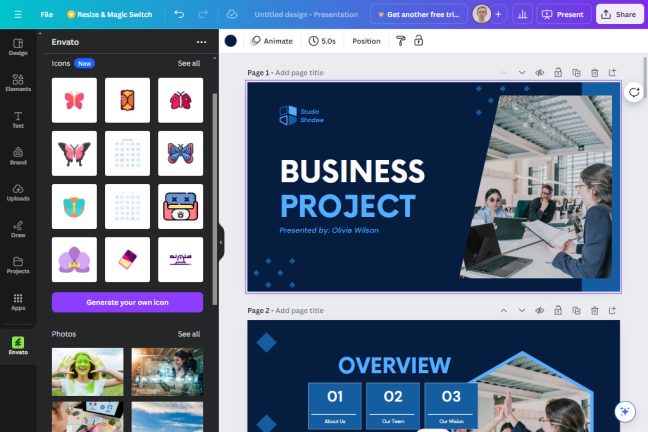
On top of that, Envato introduced a series of artificial intelligence tools called AI Labs. These include AI search, in which you can describe in human language what kind of media you’re trying to find, instead of using keywords. AI search works in Premiere Pro as well. There’s also an AI icons generator for Figma and Canva, as well as an AI image generator, all of which are included in your subscription.
Adobe Stock vs. Envato Elements: Which is best?
Still trying to decide between Adobe Stock and Envato Elements? Here’s a quick recap to help you make the right choice.
Choose Adobe Stock if…
Choose Adobe Stock for access to a large library of high-quality footage and tighter integration with Adobe’s creative tools. Adobe Stock is ideal for individuals or teams who need a broader selection of assets and or higher license protection.
30-day free trial (10 assets) | 30-day free trial (25 assets)
Choose Envato Elements if…
Choose Envato Elements when you’re looking for a budget-friendly option with unlimited downloads. It’s perfect for freelancers, small businesses, or creatives who need a variety of assets without breaking the bank. Plus, with growing AI tools and compatibility with platforms like Premiere Pro and Canva, it’s a great choice for those looking for flexibility and creative freedom at a lower cost.
Related reading:
- The 6 best stock video subscriptions in 2025
- The 8 best stock footage sites in 2025
- The 6 best Adobe Stock alternatives in 2025
- The best Envato Elements alternatives 2025
- Envato Elements vs. Motion Array: Which is best? [2025]
This article was originally published in April 2023. The most recent update was in April 2025.