With very similar pricing points, the choice between Artlist vs. Epidemic Sound depends on one question: Do you need stock footage?
If you need videos, you should pick Artlist because Epidemic Sound doesn’t license footage. If you don’t, pick Epidemic Sound because it has a larger collection of SFX and a mobile app.
Best deals as of February 2, 2026:
- Get 2 months free when you subscribe to a yearly Artlist plan.
- Start your 30-day free trial of Epidemic Sound
Table of contents:
- Artlist vs. Epidemic Sound at a glance
- Artlist vs. Epidemic Sound: Which is cheaper?
- Epidemic Sound has more SFX files but doesn’t have footage
- Artlist has more integrations and tools
- Both have AI voiceovers, Artlist also includes image and video generators
- Artlist vs. Epidemic Sound: Which should you choose?
Artlist vs. Epidemic Sound at a glance
Artlist and Epidemic Sound both started as music licensing platforms but have evolved in different directions. They offer similar audio quality and licensing simplicity, but serve different types of creative workflows:
- Epidemic Sound is best for creators who want a specialized audio solution. Its focused approach to music and sound effects, combined with excellent Adobe integrations, polished mobile apps, and streamlined interface make it ideal for podcasters, YouTubers, and video editors who already have their visual assets covered and just need high-quality audio.
- Artlist is best for creators who want an all-in-one creative toolkit. Its combination of audio, 8K footage, video templates, AI tools, professional plugins, and copyright protection through Clearlist make it the superior choice for video creators, agencies, and content teams who want to handle their entire post-production workflow from a single platform.
| Feature | Artlist | Epidemic Sound |
|---|---|---|
| Rating | 4.5/5 | 4.5/5 |
| Cost | $9.99 to $39.99 | $9.99 to $59.99 |
| Music tracks | 60,000 | 50,000 |
| Sound effects | 50,000 | 200,000 |
| Videos | 180,000 | – |
| Video templates | 20,000 | – |
| AI tools | Image, video, voice generation | Voice generation |
| Mobile app | – | iOS and Android with full features |
| Adobe integration | Premiere Pro extension | Premiere Pro, After Effects, Audition |
| Other features | 50+ professional plugins, copyright protection tool, AI search, Artboards | – |
| Best deal | 2 months free | 30-day free trial |
Keep in mind that your choice might depend on your existing creative software ecosystem. If you’re heavily invested in Adobe Creative Suite, Epidemic Sound’s deeper integrations across multiple Adobe apps might give it an edge for audio-only needs. However, if you’re looking to consolidate multiple subscriptions into one platform, Artlist’s broader feature set could provide better overall value.
Both platforms use simple, creator-friendly licensing that covers most use cases without complex restrictions. The main difference is scope: Epidemic Sound excels at doing one thing exceptionally well, while Artlist aims to be your complete creative toolkit.
Artlist vs. Epidemic Sound: Which is cheaper?
Key takeaway: Epidemic Sound’s audio plans are cheaper; Artlist has special plans for footage and AI, and offers more for the price.
At first glance, both Artlist and Epidemic Sound start with $9.99 monthly plans (annual billing), but the pricing structure becomes more nuanced when you look beyond the surface.
For audio files, both platforms offer their entry-level plans at $9.99 per month with annual billing. This jumps to $14.99 for Artlist and $17.99 for Epidemic Sound if you prefer month-to-month payments. With either service, you get unlimited downloads from their music and sound effects libraries and rights to monetize one personal channel per platform (YouTube, Instagram, TikTok, Facebook, and Twitch).

Working with clients or managing multiple channels requires upgrading to Pro plans. Epidemic Sound charges $16.99 monthly (annual billing) or $39.99 (monthly billing) for their Pro subscription. Artlist breaks their Pro plan into two tiers: Music Pro at $16.58 monthly and Music & SFX Pro at $24.92 monthly, both requiring an annual commitment. For freelancers handling client projects, Epidemic Sound is more budget-friendly in the audio department.
Artlist extends beyond audio with additional services. Their Footage & Templates plan runs $31.99 monthly for access to 8K video footage, templates, and LUTs. Filmmakers needing more control over color grading can add the RAW/LOG footage option for an additional $20 monthly.
The comprehensive Artlist Max subscription combines all media types with 50+ video editing plugins, Premiere Pro integration, and 5,000 AI credits for $39.99 monthly.

AI features appear in both platforms’ top-tier plans, but Artlist offers a dedicated AI Suite ranging from $11.99 to $79.99 monthly, providing up to 200,000 AI credits. Artlist Max subscribers can add these extra credits at half price.
An important consideration: both services link licensing to active subscriptions. When you cancel, you lose the rights to use downloaded assets in new projects, though previously published content remains protected under the original license terms.
For those wanting to try before committing, Epidemic Sound offers 30-day free trials and coupons. Artlist provides Photutorial readers with two extra months on annual subscriptions.
Read my guides on Artlist pricing and Epidemic Sound pricing.
Epidemic Sound has more SFX files but doesn’t have footage
Epidemic Sound’s sound effects library contains 200,000 files compared to Artlist’s 50,000. They both cover the same breadth of topics, but Epidemic has more selection.
The audio-focused approach means Epidemic Sound doesn’t offer video footage, motion graphics templates, or visual assets. The platform concentrated on music and sound effects from its launch and maintained that focus. You browse audio content exclusively when searching their catalog.

Artlist absorbed its sister company Artgrid and expanded beyond audio. The platform now includes 180,000 videos, video templates, and LUTs alongside effects. Videos are available in up to 8K resolution, motion graphics templates are available for all major editing software, and RAW/LOG files are great for color grading projects.

This shapes how you plan projects. Video creators working on talking-head content or vlogs, where they mostly need background music and basic sound effects, can tap into Epidemic Sound’s larger audio catalog. The extra 150,000 sound effects provide more variety when you need specific ambient noise or transition elements.
Projects mixing live footage with graphics, stock video, and complex audio benefit from Artlist’s combined approach. You can download B-roll footage, grab a lower-third template, and find matching background music from one platform. The workflow stays within a single ecosystem instead of managing multiple subscriptions and separate licenses across different services.
Artlist has more integrations and tools
Artlist goes beyond just being a media library—it bundles an entire collection of editing tools with its subscriptions. The platform includes over 50 professional plugins, turning what could be a simple asset download into a complete workflow solution.
The setup process centers around the Artlist Hub application. After downloading and signing in once, the Hub automatically detects your editing software and installs the right extensions. Updates happen in the background without you needing to check for them manually.
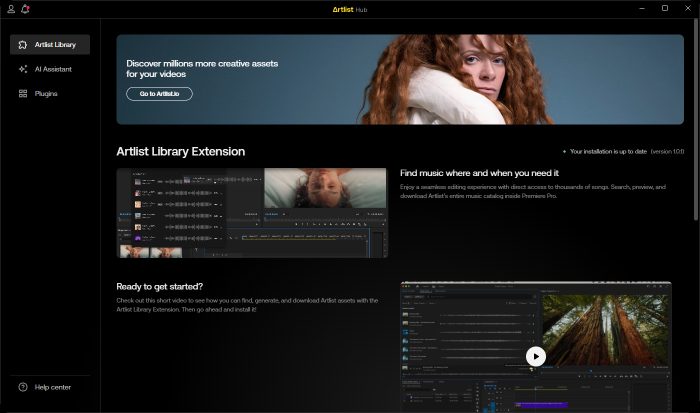
Once installed, you get three main tools that work directly inside your editor. The Library extension brings Artlist’s search capabilities into Premiere Pro, so you can browse and download assets without jumping to your browser. The AI Assistant handles routine editing tasks—it removes awkward silences from interviews and creates emphasis zooms on important moments.
The real depth comes from the 50+ plugin collection. These aren’t basic effects; they match the quality of standalone color grading and visual effects programs. The collection includes color grading tools with advanced exposure and contrast controls, visual effects like distortions and particles, transition and motion graphics tools, and audio enhancement plugins for cleaning up dialogue.

After installation, all plugins appear in your editor’s effects panel under the Artlist category. Each plugin includes preset options for quick application, plus manual controls when you need detailed customization. The system works across Premiere Pro, After Effects, Final Cut Pro, and DaVinci Resolve.
Epidemic Sound takes a different approach with its Adobe plugins for Premiere Pro, After Effects, and Audition, plus an extension for DaVinci Resolve Studio. These work well for browsing and downloading audio directly within your editor, but they focus on media access rather than adding new editing capabilities. You get convenient access to the library, but not the expanded toolkit that Artlist provides.
Both have AI voiceovers, Artlist also includes image and video generators
Epidemic Sound offers only AI voiceovers, while Artlist provides image generation, video animation, and speech synthesis. The difference affects your workflow if you need AI help beyond creating audio.
Epidemic Sound’s “Voices” feature converts text into speech using 20 voice options recorded from actual voice actors. Pro subscribers get 50,000 credits monthly, with each text character costing one credit. You can change playback speed between 0.8x and 1.2x and pick from languages like English, German, and Spanish. The tool handles basic text-to-speech conversion without complex customization.

Artlist added three AI tools in April 2025. The image generator includes 15+ visual styles that cost between 10 and 120 credits per image. You enter a text prompt, pick a style, and get generated images for thumbnails, social media, or video backgrounds.
The video generator animates existing images instead of creating footage from text prompts. You create an image first, then pay extra credits to animate it into 5- or 10-second clips. This two-step approach takes longer than tools like Runway or Pika Labs, but creates motion graphics for projects that need animated elements.

Artlist’s voiceover tool has 50+ voice options with more controls than Epidemic Sound. You can choose accents (American, Australian, British, or Indian) and change emotional delivery from neutral to surprised or sad. Max subscribers get up to 120,000 credits monthly versus Epidemic’s 50,000, which allows longer audio generation or using multiple AI tools together.

Artlist vs. Epidemic Sound: Which should you choose?
If you’re still weighing your options, here are some final thoughts to help you decide.
Go with Artlist if you need a complete content creation toolkit. Its combination of 8K footage, professional audio, video templates, and 50+ editing plugins suits video creators who want everything in one subscription. The Clearlist feature resolves copyright claims within 10-60 minutes. Artlist’s all-in-one approach means you can focus on creating instead of managing multiple subscriptions across different platforms.
Go with Epidemic Sound if you only need high-quality audio for your projects. Its curated library of 50,000 music tracks and 200,000 sound effects costs just $9.99 monthly, with included Adobe integrations and mobile apps. The platform’s audio focus provides deeper music discovery tools and stem separation options that multi-media platforms don’t match. Epidemic Sound fits podcasters, social media creators, and video editors who already have their visual assets covered but need professional audio to complete their projects.
Related reading:
- The best stock music sites in 2026
- The best stock footage sites in 2026
- The best stock video subscriptions in 2026
This article was originally published in January 2023. The most recent update was in May 2025.