Creative projects need stock media, and unlimited subscriptions are a novel, affordable solution. Envato and Storyblocks provide two different approaches to this need.
Envato costs $16.50 monthly for access to 22 million files, including 12.1 million images and 7.5 million videos. In 2025, they added AI tools for generating images, videos, and audio at no extra cost. Storyblocks charges $35 monthly for its 2.3 million assets, built-in video editor, and up to $20,000 indemnity protection.
I used both video subscriptions for various projects, from social media content to client presentations. In this comparison, I examine their libraries, costs, tools, and overall value to help you pick the right platform for your work.

Note: “Envato Elements” is now called just “Envato”.
Table of contents:
- Envato vs. Storyblocks at a glance
- Envato vs. Storyblocks: Which is cheaper?
- Envato’s library is much larger and more varied than Storyblocks’
- Envato offers a full AI suite; Storyblocks has a video editor
- Envato is integrated into more creative tools
- Envato vs. Storyblocks: Which should you choose?
Envato vs. Storyblocks at a glance
Before we get into the nitty-gritty details, let’s take a quick look at how these two stock media giants stack up against each other in a side-by-side comparison table.
| Feature | Envato | Storyblocks |
|---|---|---|
| Libary size | 22 million | 2 million |
| Assets | Videos, images, graphics, fonts, music, SFX, templates, presets, 3D | Videos, images, music, SFX, templates |
| AI tools | Image, video, music, and voice generators | – |
| Integrations | Premiere Pro, After Effects, Adobe Express, Canva, WordPress, Figma | Premiere Pro, After Effects |
| Other tools | Image editor (background remover,…) | Video editor |
| Price | $14.85 (with coupon below) | $35 |
| Coupon | 10% Off Coupon | – |
Envato vs. Storyblocks: Which is cheaper?
Envato is not only much cheaper than Storyblocks but also offers much more value for your money.
At $16.50 per month with an annual commitment, Envato costs almost exactly half of what you’ll pay for Storyblocks’ comparable Unlimited Pro plan at $35 per month (both with annual billing). This price gap is even wider for month-to-month subscribers, where Envato charges $39 compared to Storyblocks’ steep $70.

The value difference becomes even more apparent when examining what’s included. Envato gives you access to 22 million assets, which is over ten times Storyblocks’ 2 million files. Envato also includes several AI tools (image, video, audio generators) at no extra cost, while Storyblocks offers no AI functionality whatsoever.
Storyblocks has two more plans: the Unlimited All Access plan for $30 per month (or $65 billed monthly) that doesn’t include the plugin for Creative Cloud. The much more limited Starter plan for $15 per month includes only 5 downloads of HD footage, music, and images.

Meanwhile, Envato includes plugins for Premiere Pro and After Effects and adds integrations for Adobe Express, Canva, Figma, and WordPress at no additional cost.
Students get an even better deal with Envato, paying approximately $10 per month with verified student status. Envato also offers a 10% discount for Photutorial readers.
Envato’s library is much larger and more varied than Storyblocks’
Envato contains over 22 million files, while Storyblocks has around 2.3 million. This difference is clear across all content types. There are 12.1 million images and 7.5 million videos on Envato compared to 2.1 million images and 3.8 million videos on Storyblocks.

The numbers tell the same story for specialized content. Envato includes 282,000 3D models, 627,000 templates, and 270,000 music tracks. Storyblocks has just 22,000 templates and 83,000 audio files. Both platforms stop at 4K video resolution, so if you need 8K footage, I recommend a great Envato alternative like Artlist or Motion Array.
Envato also adds about half a million new files each month. This growth comes with less strict curation, so you often spend more time filtering through search results to find what you need.
The library size matters most for specific projects. When I created a corporate presentation about AI, Envato gave me dozens of tech animations to choose from, while Storyblocks only showed a few options. For a wedding video project, I found more variety in transition templates and music styles on Envato.
But having more assets doesn’t always mean better quality. While both platforms focus on quantity, you’re more likely to find exactly what you need in Envato’s larger selection, without subscribing to multiple services.
Envato offers a full AI suite; Storyblocks has a video editor
Envato and Storyblocks package different content creation tools with their subscriptions. Envato gives you AI generators, while Storyblocks includes a basic video editor.
Every Envato plan comes with six AI content tools called Envato Labs. When using ImageGen, you type a description like “robot walking a dog in a futuristic park,” pick portrait or landscape format, and see eight AI-created images within seconds. The system pulls from models like DALL·E 3 and Stable Diffusion to create these visuals.

Envato’s VideoGen produces short 5-second video clips in two ways. You can either provide a description or upload an existing image, and the image-to-video tool adds movement, such as panning across a landscape or zooming in on a product. You can create videos in widescreen (16:9) or vertical (9:16) formats for different social platforms.
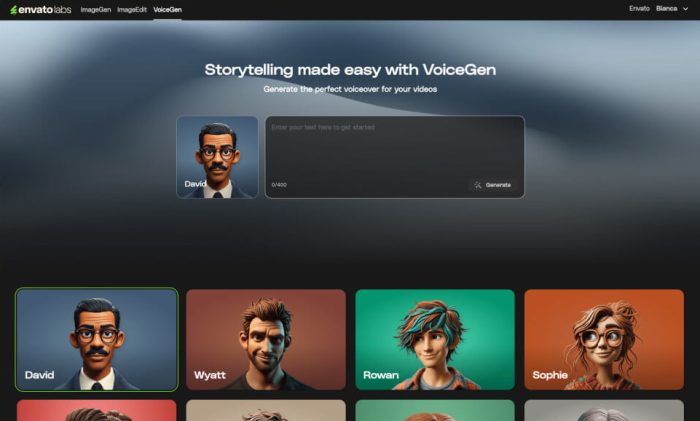
For audio needs, Envato offers two more AI tools. MusicGen creates short background tracks when you describe what you want and adjust settings for mood and tempo. With VoiceGen, you paste in a script (up to 400 characters), select from 12 voice options, and adjust speed and tone before generating spoken audio. Longer scripts require breaking them into smaller chunks and generating each separately.
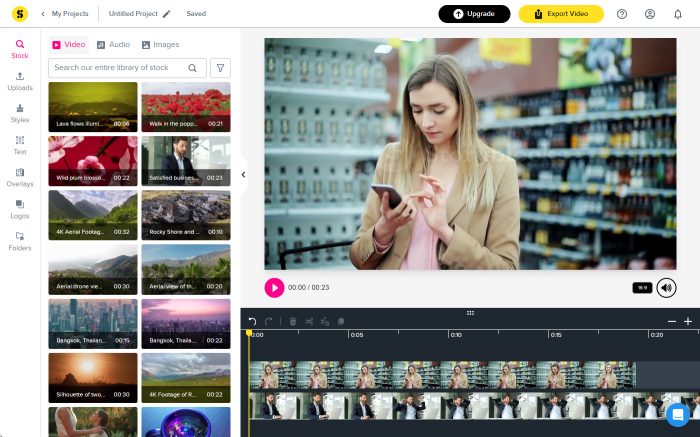
Storyblocks takes a hands-on approach with Maker, its web-based video editor. You can use it even with a free account. After adding clips from the Storyblocks library or uploading your own, you cut segments, add transitions between scenes, and adjust how elements blend together by changing their opacity.
Text tools in Maker let you drop animated titles onto your videos and match your brand by setting specific colors and fonts. When finishing a project, the editor suggests formats sized correctly for different social platforms. While Maker handles simple projects well, it lacks features found in programs like Premiere Pro or Final Cut.
To save time, Storyblocks offers pre-made templates, though finding the right one means scrolling through all options without filters. Since everything runs in your browser, you don’t need to install anything or have technical skills to start editing.
Envato is integrated into more creative tools
Envato connects directly to more editing and design tools than Storyblocks, letting you work with stock assets without leaving your app. For video-only work inside Adobe apps, you can connect both services, but Envato’s plugin is included for free.
Envato extension is available for Premiere Pro, After Effects, Canva, Figma, WordPress, and Adobe Express. After installing an Envato plugin (in Premiere Pro, for instance), you can search for footage, music, or templates in the sidebar and send them to your timeline. The workflow is similar in Canva and Figma—you can find templates or create AI-generated icons from inside the workspace, which speeds up basic design tasks.

Storyblocks supports only two Creative Cloud apps: Premiere Pro and After Effects. And even then, they are available only with the Unlimited Pro plan that costs $35 per month.
If you need to design assets in Canva or Figma or generate AI content within those apps, Storyblocks doesn’t have a solution. Most of the time, you’ll download media from Storyblocks’ site and bring it in by hand.
Envato vs. Storyblocks: Which should you choose?
If you’re still weighing your options, here are some final thoughts to help you decide.
Choose Envato Elements if:
- You need a large variety of assets beyond just video (templates, fonts, 3D models)
- You want AI tools for generating images, videos, music, and voice
- You work on multiple platforms (Premiere Pro, Canva, Figma)
- You download a high volume of assets each month
Choose Storyblocks if:
- You only need basic Adobe integrations
- You need substantial legal protection for client work ($20,000 indemnity)
- You want a simple video editor built into the platform
- You prefer quality over quantity in stock footage
Related reading:
- The best Envato alternatives in 2026
- The best Storyblocks alternatives in 2026
- The best stock music sites in 2026
This article was originally published in July 2023. The most recent update was in May 2025.