


- Listening on multiple ports
- Multi-level forward proxy - proxy chain
- Standard HTTP/HTTPS/HTTP2/SOCKS4(A)/SOCKS5 proxy protocols support
- Probing resistance support for web proxy
- Support multiple tunnel types
- TLS encryption via negotiation support for SOCKS5 proxy
- Tunnel UDP over TCP
- TCP/UDP Transparent proxy
- Local/remote TCP/UDP port forwarding
- Shadowsocks protocol
- SNI proxy
- Permission control
- Load balancing
- Routing control
- DNS resolver and proxy
- TUN/TAP device
Wiki: v2.gost.run
Telegram group: https://t.me/gogost
Google group: https://groups.google.com/d/forum/go-gost
https://github.com/ginuerzh/gost/releases
git clone https://github.com/ginuerzh/gost.git
cd gost/cmd/gost
go builddocker run --rm ginuerzh/gost -Vbrew install gostsudo snap install core
sudo snap install gost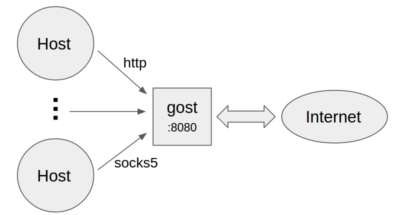
- Standard HTTP/SOCKS5 proxy
gost -L=:8080- Proxy authentication
gost -L=admin:123456@localhost:8080- Multiple sets of authentication information
gost -L=localhost:8080?secrets=secrets.txtThe secrets parameter allows you to set multiple authentication information for HTTP/SOCKS5 proxies, the format is:
# username password

test001 123456
test002 12345678
- Listen on multiple ports
gost -L=http2://:443 -L=socks5://:1080 -L=ss://aes-128-cfb:123456@:8338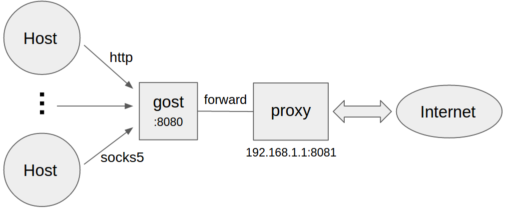
gost -L=:8080 -F=192.168.1.1:8081- Forward proxy authentication
gost -L=:8080 -F=http://admin:[email protected]:8081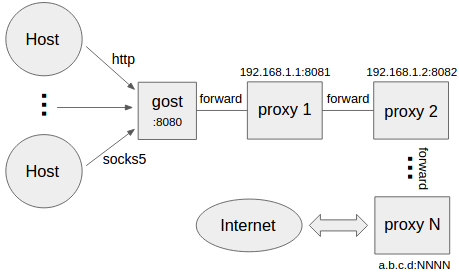

gost -L=:8080 -F=quic://192.168.1.1:6121 -F=socks5+wss://192.168.1.2:1080 -F=http2://192.168.1.3:443 ... -F=a.b.c.d:NNNNGost forwards the request to a.b.c.d:NNNN through the proxy chain in the order set by -F, each forward proxy can be any HTTP/HTTPS/HTTP2/SOCKS4/SOCKS5/Shadowsocks type.
gost -L=tcp://:2222/192.168.1.1:22 [-F=...]The data on the local TCP port 2222 is forwarded to 192.168.1.1:22 (through the proxy chain). If the last node of the chain (the last -F parameter) is a SSH forwad tunnel, then gost will use the local port forwarding function of SSH directly:
gost -L=tcp://:2222/192.168.1.1:22 -F forward+ssh://:2222gost -L=udp://:5353/192.168.1.1:53?ttl=60 [-F=...]The data on the local UDP port 5353 is forwarded to 192.168.1.1:53 (through the proxy chain).
Each forwarding channel has a timeout period. When this time is exceeded and there is no data interaction during this time period, the channel will be closed. The timeout value can be set by the ttl parameter. The default value is 60 seconds.
NOTE: When forwarding UDP data, if there is a proxy chain, the end of the chain (the last -F parameter) must be gost SOCKS5 proxy, gost will use UDP-over-TCP to forward data.
gost -L=rtcp://:2222/192.168.1.1:22 [-F=... -F=socks5://172.24.10.1:1080]The data on 172.24.10.1:2222 is forwarded to 192.168.1.1:22 (through the proxy chain). If the last node of the chain (the last -F parameter) is a SSH tunnel, then gost will use the remote port forwarding function of SSH directly:
gost -L=rtcp://:2222/192.168.1.1:22 -F forward+ssh://:2222gost -L=rudp://:5353/192.168.1.1:53?ttl=60 [-F=... -F=socks5://172.24.10.1:1080]The data on 172.24.10.1:5353 is forwarded to 192.168.1.1:53 (through the proxy chain).
Each forwarding channel has a timeout period. When this time is exceeded and there is no data interaction during this time period, the channel will be closed. The timeout value can be set by the ttl parameter. The default value is 60 seconds.
NOTE: When forwarding UDP data, if there is a proxy chain, the end of the chain (the last -F parameter) must be gost SOCKS5 proxy, gost will use UDP-over-TCP to forward data.
Gost HTTP2 supports two modes:
-
As a standard HTTP2 proxy, and backwards-compatible with the HTTPS proxy.
-
As a transport tunnel.
Server:
gost -L=http2://:443Client:
gost -L=:8080 -F=http2://server_ip:443?ping=30Server:
gost -L=h2://:443Client:
gost -L=:8080 -F=h2://server_ip:443Support for QUIC is based on library quic-go.
Server:
gost -L=quic://:6121Client:
gost -L=:8080 -F=quic://server_ip:6121NOTE: QUIC node can only be used as the first node of the proxy chain.
Support for KCP is based on libraries kcp-go and kcptun.
Server:
gost -L=kcp://:8388Client:
gost -L=:8080 -F=kcp://server_ip:8388Gost will automatically load kcp.json configuration file from current working directory if exists, or you can use the parameter to specify the path to the file.
gost -L=kcp://:8388?c=/path/to/conf/fileNOTE: KCP node can only be used as the first node of the proxy chain.
Gost SSH supports two modes:
-
As a forward tunnel, used by local/remote TCP port forwarding.
-
As a transport tunnel.
Server:
gost -L=forward+ssh://:2222Client:
gost -L=rtcp://:1222/:22 -F=forward+ssh://server_ip:2222Server:
gost -L=ssh://:2222Client:
gost -L=:8080 -F=ssh://server_ip:2222?ping=60The client supports the ping parameter to enable heartbeat detection (which is disabled by default). Parameter value represents heartbeat interval seconds.
Iptables-based transparent proxy
gost -L=redirect://:12345 -F=http2://server_ip:443Contributed by @isofew.
Server:
gost -L=obfs4://:443When the server is running normally, the console prints out the connection address for the client to use:
obfs4://:443/?cert=4UbQjIfjJEQHPOs8vs5sagrSXx1gfrDCGdVh2hpIPSKH0nklv1e4f29r7jb91VIrq4q5Jw&iat-mode=0Client:
gost -L=:8888 -F='obfs4://server_ip:443?cert=4UbQjIfjJEQHPOs8vs5sagrSXx1gfrDCGdVh2hpIPSKH0nklv1e4f29r7jb91VIrq4q5Jw&iat-mode=0'For HTTP, you can use TLS to encrypt the entire communication process, the HTTPS proxy:
Server:
gost -L=http+tls://:443Client:
gost -L=:8080 -F=http+tls://server_ip:443Gost HTTP2 proxy mode only supports the use of TLS encrypted HTTP2 protocol, does not support plaintext HTTP2.
Gost HTTP2 tunnel mode supports both encryption (h2) and plaintext (h2c) modes.
Gost supports the standard SOCKS5 protocol methods: no-auth (0x00) and user/pass (0x02), and extends two methods for data encryption: tls(0x80) and tls-auth(0x82).
Server:
gost -L=socks://:1080Client:
gost -L=:8080 -F=socks://server_ip:1080If both ends are gosts (as example above), the data transfer will be encrypted (using tls or tls-auth). Otherwise, use standard SOCKS5 for communication (no-auth or user/pass).
Support for shadowsocks is based on library shadowsocks-go.
Server:
gost -L=ss://aes-128-cfb:123456@:8338Client:
gost -L=:8080 -F=ss://aes-128-cfb:123456@server_ip:8338Currently, only the server supports UDP Relay.
Server:
gost -L=ssu://aes-128-cfb:123456@:8338There is built-in TLS certificate in gost, if you need to use other TLS certificate, there are two ways:
-
Place two files cert.pem (public key) and key.pem (private key) in the current working directory, gost will automatically load them.
-
Use the parameter to specify the path to the certificate file:
gost -L="http2://:443?cert=/path/to/my/cert/file&key=/path/to/my/key/file"Client can specify secure parameter to perform server's certificate chain and host name verification:
gost -L=:8080 -F="http2://server_domain_name:443?secure=true"Client can specify a CA certificate to allow for Certificate Pinning:
gost -L=:8080 -F="http2://:443?ca=ca.pem"Certificate Pinning is contributed by @sheerun.