 By Vipin Kanwal
If you’ve ever sat staring at your computer after uploading a video, feeling drained because now you still have to write a description, come up with a catchy title, post clips on social, and maybe even reply to comments—you’re not alone. Creating YouTube content isn’t just about filming and editing. It’s a full process with dozens of little tasks that eat up your time.
That’s where an AI workflow automation for YouTube videos comes in. Think of it as your content roadmap—helping you save hours, stay consistent, and most importantly, avoid burnout. Let’s dive into why it matters and how it works in real life.
Why Creators Struggle Without a Workflow
Most YouTubers (especially solo creators or small teams) juggle multiple roles—scriptwriter, editor, marketer, community manager. Without a clear workflow:
- Tasks pile up. You spend more time switching between tasks than actually creating.
- Inconsistency creeps in. Upload schedules slip because life gets in the way.
- Burnout happens. Constantly doing everything manually is mentally exhausting.
I’ve seen creators pour 10+ hours into a single video and then skip uploading for weeks because the “extras”—thumbnails, descriptions, and promo—felt overwhelming. An AI workflow fixes that by automating the repetitive parts.
How YouTube Video Workflow Actually Saves You Time
Here’s the fun part. A modern YouTube workflow doesn’t just organize tasks—it actually automates them. For example:

Using Your Transcript as a Foundation
Once your video is uploaded (or even before), the workflow can use your YouTube transcript to automatically generate:
- Video titles
- Descriptions
- Timestamps
- First pinned comments
- Tags and keywords
Bonus: 6 AI Workflow Automation Ideas That Will Boost Productivity At Work By 10x
Repurposing Content Instantly
Instead of manually writing Instagram captions or TikTok scripts, you can ask AI to reference your transcript to:
- Write social media posts
- Create short reel or TikTok scripts
- Draft email newsletters promoting your video
- Suggest blog post outlines
Batching Content Creation
Imagine recording one video and, within an hour, having all the pieces for YouTube, Instagram, Twitter, LinkedIn, and even your website ready to go. That’s the real power of a structured workflow—it multiplies your output without multiplying your effort.
In short, the workflow isn’t just about saving time—it’s about recycling your effort so every video works across multiple platforms.
How Workflows Reduce Burnout
Time savings are great, but what about mental fatigue? A workflow helps here too:
- Fewer decisions per video. You’re not reinventing the wheel for each upload.
- Clear steps. You know exactly what to do next instead of guessing.
- Energy for creativity. With the boring stuff automated, you can focus on writing, filming, and engaging with your audience.
One creator I worked with said, “I stopped dreading uploads once my workflow was set up. Now I can enjoy making videos again instead of stressing about the busywork.”
Bonus: Top Workflow Automation Tools for Business Operations
How to Use Simplified YouTube Video Workflow Template
So, here’s the fun part—actually putting this workflow into action. Think of it as your behind-the-scenes assistant that takes care of all the little (but time-consuming) details for your YouTube channel.
This workflow uses your YouTube transcript to automatically create titles, descriptions, timestamps, first comments, and basically all the stuff you’d normally spend hours tweaking before hitting publish. And it doesn’t stop there—you can even ask the AI to reference your transcript to draft social media posts, reel scripts, or highlight snippets that help you repurpose your video across platforms. Pretty neat, right?
Now, let’s break it down into steps:
Steps to Get Started YouTube Video Workflow Template
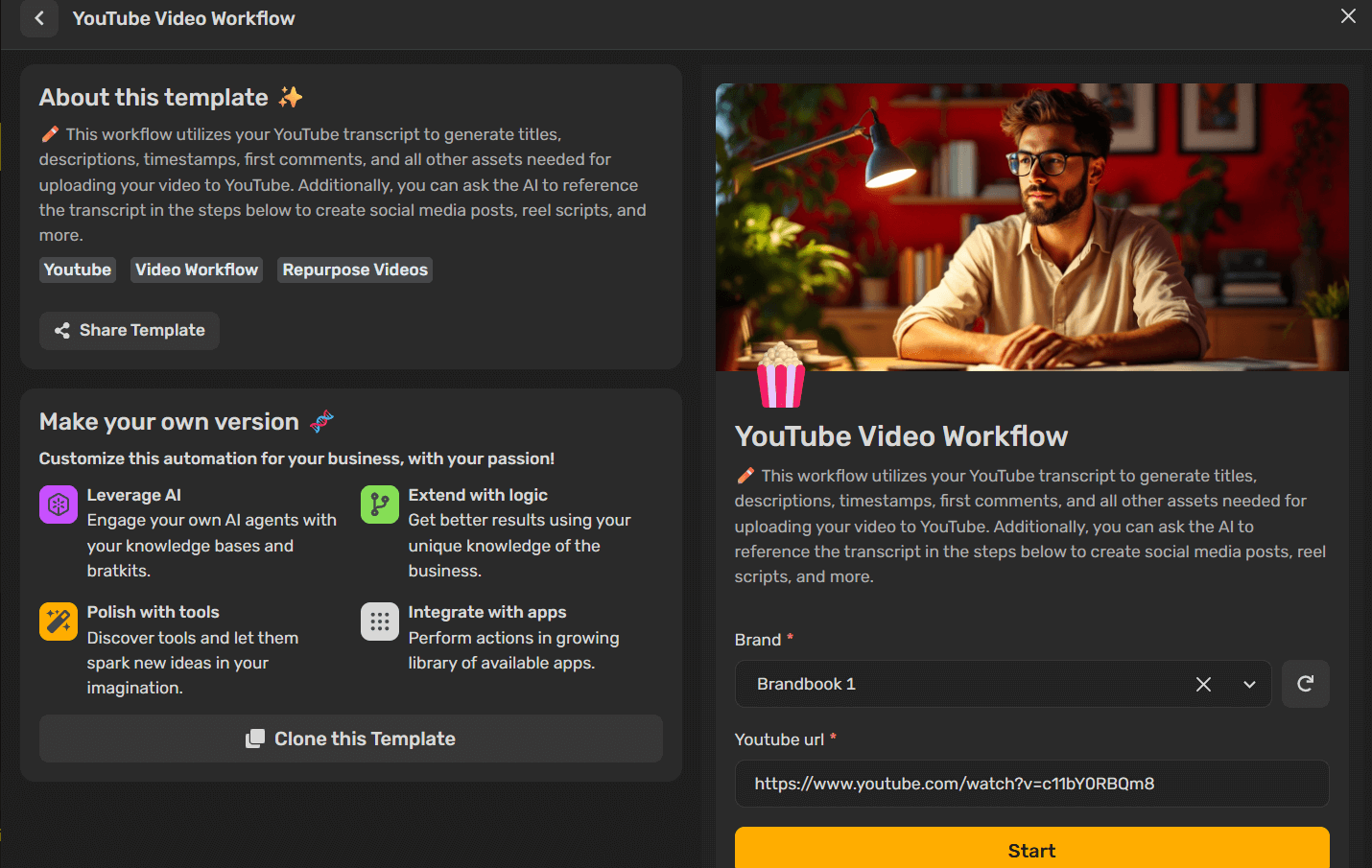
- Add your brandbook – This ensures everything (titles, descriptions, posts) reflects your brand voice and style.
- Paste your YouTube video URL – The AI will pull your transcript and start working its magic.
- Click Start – Sit back, relax, and let the workflow generate all the content assets you need.
Also You can Make Your Own Version
Every creator has their own style, and the beauty of this workflow is that you can shape it to fit yours. Here’s how you can make it your own:
- Connect your favorite apps – Whether it’s scheduling software, design apps, or project management tools, integrate them into the workflow so everything runs in one smooth line.
- Bring in AI with your own flavor – Instead of a one-size-fits-all setup, feed the AI with your knowledge base, brand guidelines, or even your past content so it reflects your voice.
- Add logic where it matters – Maybe you want longer captions for LinkedIn but shorter ones for Instagram. You can tweak the workflow to follow those rules so you always get results tailored to your needs.
- Polish with creative tools – Experiment with different editing, design, or captioning tools along the way. Sometimes a little extra polish can spark new content ideas.
Final Thoughts
Behind every successful YouTube creator isn’t just talent—it’s structure. A smart video workflow doesn’t just shave off hours of editing and uploading; it gives you breathing room. When titles, descriptions, timestamps, and even social posts are generated from your transcript, you’re no longer stuck in the cycle of copy-paste fatigue. Instead, you get back valuable time to brainstorm your next big idea.
The real win? Burnout takes a backseat. By letting AI handle the repetitive tasks, your creative energy goes where it belongs—into making content that connects with your audience. And since the workflow is flexible, you can shape it around your brand’s voice, add your own creative flair, and plug it into the apps you already use.
Think of it this way: your workflow isn’t just a tool—it’s a quiet teammate working behind the scenes so you can stay focused on what lights you up.